BLOG
How to Verify a Job Posting: A Complete Guide to Spotting Fake Jobs
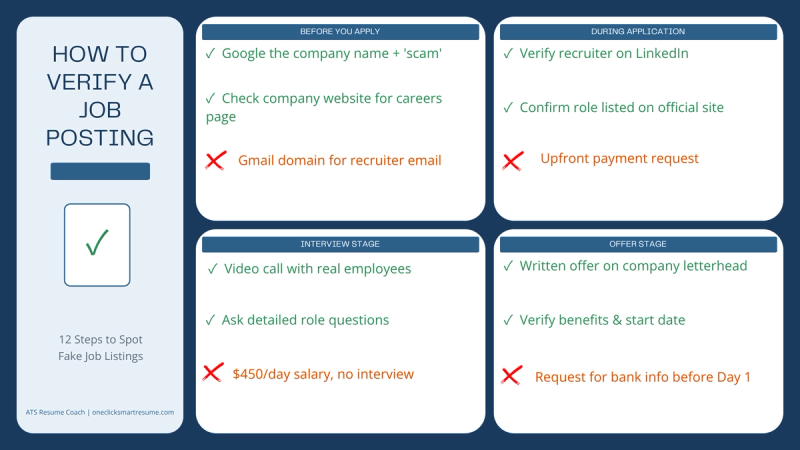
12-step guide to verify job postings before you apply. Learn to spot salary red flags, domain mismatches, fake recruiters, and impersonation scams.
How to Verify a Job Posting: A Complete Guide to Spotting Fake Jobs
Category: Job Search Guide | Reading Time: 9 minutes
Before you spend 30 minutes tailoring your resume, before you fill out an application, before you get excited about a job that looks perfect: run through this guide. It takes 5 minutes. It could save you thousands.
Section 1: Before You Apply
The first checkpoint happens before you even click 'Apply.' This is where most scams get caught if you know what to look for.
Step 1: Domain Legitimacy Check
Does the recruiter's email address match the company's official domain? A recruiter claiming to work for Robert Half but emailing from gmail.com is an immediate red flag. So is @roberthalf-hiring.com or @robert-half.com. Scammers are betting you won't notice the slight misspelling or the third-party email service.
How to verify: Visit the company's official website. Go to their Careers or Contact page. What email domain do they use for recruiting? If the recruiter's email doesn't match, don't apply.
Step 2: Company Legitimacy
Is the company real? Does it have an active presence on LinkedIn, Glassdoor, and their own career page? Scammers create shell companies or impersonate real ones. A company that only exists on job boards is a red flag.
How to verify: Search the company on LinkedIn. Do they have an active company page? Check their headcount, industry, and recent hiring activity. Look at Glassdoor reviews. Real companies have footprints across multiple platforms. If they don't, that's suspicious.
Step 3: Salary Reality Check
Does the salary match the market rate for this role in your location and experience level? A Customer Service Representative offering $450 per day (when market rate is $18-22 per hour, or roughly $144-176 per 8-hour day) is not a real opportunity. It's bait.
How to verify: Use Glassdoor, PayScale, or Levels.fyi to check market rates. If a job is offering 50% above market rate for an entry-level or mid-level role, verify the company exists and is actually hiring. If it's a startup offering Silicon Valley salaries in a Midwest market, dig deeper.
Section 2: During Application
You've passed the initial checks. Now the application process itself will tell you if this job is real.
Step 4: Suspicious Information Requests
Are they asking for information you've already provided? A scammer posing as a LinkedIn recruiter was requesting full name, phone number, and address from applicants. But that information was already in their LinkedIn profile and resume. Why ask again? To harvest data from multiple sources and sell it or use it for identity theft.
Red flag: Any request for SSN, bank account details, or payment information before a formal offer and background check. If they ask for money upfront (background check fees, uniform deposits, equipment costs), STOP. Legitimate companies pay for background checks, not applicants.
Step 5: Recruiter Verification
Does the recruiter actually work for the company? Check their LinkedIn profile. How long have they been with the company? Do they have a history of legitimate hiring activity? Scammers create fake LinkedIn accounts or take over old dormant ones.
How to verify: Search the recruiter on LinkedIn by name. Click through to their profile. Does their employment history match the company they claim to represent? Are they connected to other employees from that company? Do they have recent activity? A brand new profile or one that hasn't been updated in years is suspicious.
Step 6: Application Process Red Flags
Watch for urgency and pressure tactics. 'Respond within 24 hours or we're moving to another candidate.' 'Limited spots available.' Legitimate companies don't operate on artificial deadlines. They know hiring takes time.
Red flag: Any communication that pressures you to make a quick decision, especially before a phone conversation or formal interview.
Section 3: Interview Stage
You've passed the initial screening. An interview is scheduled. Here's how to verify it's real before you show up.
Step 7: Interview Platform Legitimacy
Are they using official platforms (Zoom, Microsoft Teams, Google Meet) or something sketchy? Legitimate companies use standard video conferencing tools. Check the meeting link. Is it a direct link from the official platform, or does it go through a third-party site first?
How to verify: Ask the recruiter directly: 'What's the Zoom meeting link?' If they're vague or send you to an unfamiliar site, it's suspicious.
Step 8: Hiring Manager Verification
Who are you interviewing with? Can you find them on LinkedIn and verify they actually work for the company? Scammers often claim to be hiring managers but don't have verifiable employment history.
How to verify: Search the interviewer's name on LinkedIn. Does their profile show employment at the company? Are they connected to other employees? If you can't find them anywhere, that's a red flag.
Step 9: Interview Content Reality Check
During the interview, do they ask about the role specifics? About your background? Or do they mostly talk about the job and push for a decision? Real interviews are two-way conversations. The hiring manager wants to understand your skills. They ask follow-up questions. Scammers follow a script.
Red flag: An interview that feels one-sided, rushed, or like the interviewer doesn't know details about the role they're supposedly hiring for.
Section 4: Offer Stage
You got an offer. Before you accept, make sure it's real.
Step 10: Offer Clarity and Formality
Legitimate offers come in writing. They outline salary, benefits, start date, reporting structure, job responsibilities. If an offer is vague ('We'll figure out benefits later') or only verbal with pressure to accept immediately, it's suspicious.
How to verify: Request the offer in writing via official company email. It should include all details. If they refuse to put it in writing or the email comes from a personal account, walk away.
Step 11: Background Check Clarity
Who conducts the background check? A legitimate third-party vendor, not the company itself. Who pays for it? The employer, not you. Are they clear about what it covers (criminal history, credit check, employment verification)?
Red flag: Any mention of upfront costs for background checks. The employer pays.
Step 12: First Day Verification
Before your first day, you should receive a welcome email with onboarding details. You should get access to email or a login portal before you start. You should know who to report to and when/where to show up.
Red flag: Being asked to work before your official start date (unpaid setup or 'onboarding'). Legitimate companies don't ask new hires to work for free.
What to Do If You Spot a Red Flag
1. Stop communication immediately. Don't respond to follow-up messages.
2. Report the listing to the job board. All major boards have report buttons.
3. File a complaint with the FTC at reportfraud.ftc.gov
4. If you shared personal information, monitor your credit at annualcreditreport.com
5. Alert the company being impersonated. If a fake job claimed to be from LinkedIn, Amazon, or Robert Half, report it to their security team.
The OneClick Advantage
This 12-step guide is your safety net. But it's a lot to remember. It's a lot to verify.
OneClick runs these checks automatically on every job posting before it reaches you. Domain verification. Company legitimacy. Salary anomalies. Behavioral patterns. Account takeovers. Brand impersonations.
You don't have to remember this checklist. You don't have to spend an hour verifying each job. When you open your OneClick digest, every single job has already passed all these checks. Your focus stays on applying to real opportunities. Your data stays safe.
References
Federal Trade Commission (FTC). (2025). Report Job Scams & Employment Fraud. Retrieved from FTC Fraud Report Portal.
Annual Credit Report. (2025). Free Credit Monitoring. Retrieved from Federal Trade Commission.
Glassdoor. (2025). Company Salaries & Reviews. Retrieved from Glassdoor.
PayScale. (2025). Salary Data & Career Tools. Retrieved from PayScale.
Levels.fyi. (2025). Tech Salary & Compensation Data. Retrieved from Levels.fyi.